Crow Canyon Software Forum
Importing CSV Date Columns

Quote from jlazzaro on February 12, 2026, 1:27 pmI have a fully functional workflow importing a CSV attachment, but when it creates the list item SharePoint is doing its "assumes everything is UTC" thing.
A date in the file of "2/11/26 0:00" is shown as "2/10/2026 6:00 PM" in the list. Looking through the available functions it's not obvious if any of them can convert a datetime to UTC. I don't want to just subtract 5 hours for my time zone, because my backwards country insists on using daylight savings time and sometimes it would need to be 6 hours.
Any suggestions on how to handle this natively within the workflow, or do I need to do something like create a calculated column in SharePoint?
I have a fully functional workflow importing a CSV attachment, but when it creates the list item SharePoint is doing its "assumes everything is UTC" thing.
A date in the file of "2/11/26 0:00" is shown as "2/10/2026 6:00 PM" in the list. Looking through the available functions it's not obvious if any of them can convert a datetime to UTC. I don't want to just subtract 5 hours for my time zone, because my backwards country insists on using daylight savings time and sometimes it would need to be 6 hours.
Any suggestions on how to handle this natively within the workflow, or do I need to do something like create a calculated column in SharePoint?

Quote from supportTeam on February 16, 2026, 2:33 pmHi Joseph,
We understand that when the date from the CSV file is imported, it is automatically converted to the site’s time zone. Based on the example you shared, the site appears to be using Central Standard Time (CST).
To prevent this conversion from occurring, please follow these steps:
- Open the NITRO Workflow.
- Edit the ‘Parse CSV’ action.
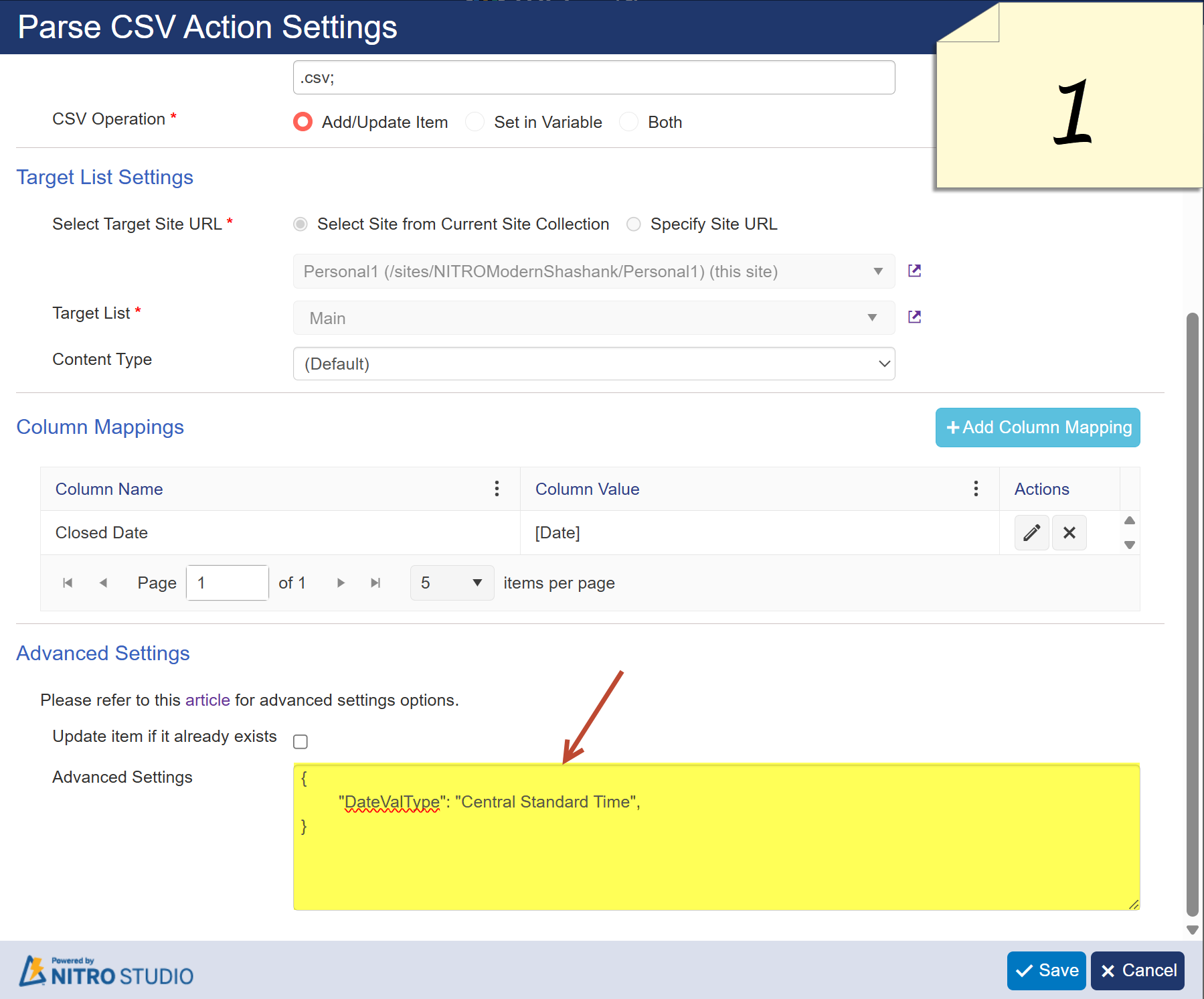
- In Advanced Settings, populate the time zone as shown in Image 1.
- If you are in a different time zone, you can look up the correct time zone names here: TimeZoneInfo.FindSystemTimeZoneById Values
- Enter the appropriate value in the advanced settings.
This will ensure the dates are interpreted correctly without being shifted by the site’s time zone.
Hi Joseph,
We understand that when the date from the CSV file is imported, it is automatically converted to the site’s time zone. Based on the example you shared, the site appears to be using Central Standard Time (CST).
To prevent this conversion from occurring, please follow these steps:
- Open the NITRO Workflow.
- Edit the ‘Parse CSV’ action.
- In Advanced Settings, populate the time zone as shown in Image 1.
- If you are in a different time zone, you can look up the correct time zone names here: TimeZoneInfo.FindSystemTimeZoneById Values
- Enter the appropriate value in the advanced settings.
This will ensure the dates are interpreted correctly without being shifted by the site’s time zone.
Uploaded files: